


Create scalable, multilingual training and onboarding videos with AI avatars. Save time, cut costs, and deliver consistent learning experiences globally.
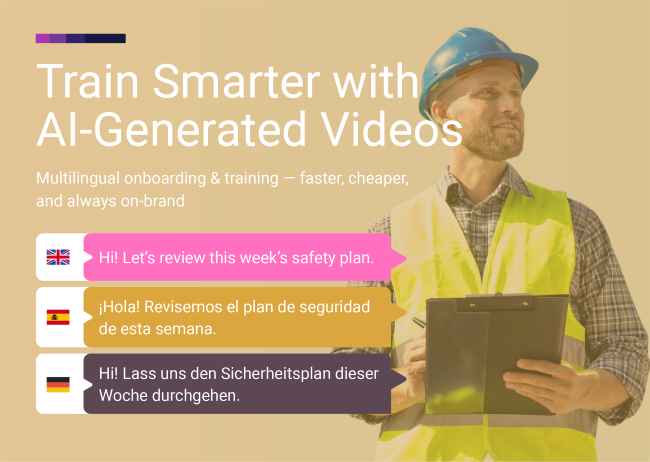
Create scalable, multilingual training videos using AI avatars—faster, cheaper, and more consistent than traditional production. Onboard employees, educate customers, and deliver compliance training in any language.
Modern businesses move fast—and so does the need to train employees, onboard new hires, and educate customers. But traditional video production is slow, expensive, and nearly impossible to scale across languages, regions, and departments.
The result? Outdated training materials, inconsistent messaging, overwhelmed L&D teams, and employees or customers who don't get the information they need when they need it.
What if you could create professional training videos in hours instead of weeks—update them instantly when policies change—and deliver them in any language without re-filming?
That's the power of AI training videos—realistic, scalable learning content powered by AI avatars that look, sound, and feel human. No cameras. No studios. No production delays.
In this guide, you'll learn:
Why AI video generators are transforming corporate training and customer education
How AI training videos work (and how easy they are to create)
Real use cases for onboarding, compliance, product tutorials, and multilingual courses
How to create your first AI training video in hours
Create Your First AI Training Video Free →
AI training videos use real human avatars—actual people filmed on location—powered by advanced lip-sync and voice synthesis technology. They deliver consistent, professional training content that can be updated instantly and localized into multiple languages.
Unlike CGI avatars (computer-generated faces), LipSynthesis uses real people filmed in professional settings, then digitized for AI-powered video generation. The result? Training videos that feel authentic, trustworthy, and engaging—not robotic or impersonal.
Choose your trainer avatar – Select from hundreds of real human avatars representing diverse demographics and professional settings, or create a custom avatar with your own face (or your training team lead's)
Write your training script – Type your onboarding walkthrough, compliance module, product tutorial, or course content
Select voice & language – Choose from multiple languages with accurate lip-sync, or upload your own audio
Generate your video – Create polished training videos in hours, not weeks
Deploy everywhere – Embed in your LMS, email sequences, help centers, product dashboards, or customer portals
No cameras. No studios. No waiting for production schedules.
The result: Consistent, on-brand training content that scales with your team—not against it.
Browse Hundreds of Real Human Training Avatars →
Traditional training video production is expensive and time-consuming:
Cost: $2,000-$10,000 per video (filming, editing, actors, studios)
Time: 2-6 weeks per video (scripting, scheduling, filming, post-production)
Updates: Require full re-shoots when content changes
AI training videos:
Cost: Pennies per video (with unlimited generation)
Time: 1-3 hours per video (script + generation)
Updates: Edit script and regenerate in minutes
The math: Companies save an average of 45 hours per month using AI video (Synthesia, 2025).
Whether it's an onboarding walkthrough, a compliance update, or a product tutorial, your AI avatars deliver the same tone, style, and brand personality every time—no matter who's watching or when.
The problem with traditional training:
Different trainers deliver content differently
Live sessions vary in quality and accuracy
Recorded sessions become outdated quickly
Inconsistent messaging confuses learners
AI training videos solve this:
Every learner gets the exact same information
Brand voice and messaging stay consistent
Quality never varies
Updates roll out instantly to everyone
Real benefit: No more "I was told something different in my training" complaints.
With AI video generators like LipSynthesis, you can create multilingual training content in multiple languages with accurate lip-sync—reaching and engaging your workforce worldwide.
Traditional multilingual training:
Hire translators and multilingual presenters
Re-film entire courses for each language
Manage multiple production schedules
Cost: $10K-$50K+ per language
AI multilingual training:
Generate the same course in multiple languages automatically
Accurate lip-sync matches each language
Consistent messaging across all markets
Cost: Pennies per language (with unlimited generation)
Real benefit: One team can launch a global training initiative in days, not months.
Policies change. Software updates roll out. Products evolve. Your training needs to keep up.
With AI training videos, you can:
Edit the script and regenerate in minutes
Keep your training library current without costly reshoots
Roll out updates to all learners instantly
Maintain compliance with latest regulations
Traditional video updates: 2-6 weeks + $2K-$10K per video AI video updates: 30-60 minutes + $0 (with unlimited generation)
As your company grows, training demands increase. AI videos let you scale training content without scaling your L&D team.
The data:
Companies using AI video reduce training production time by 78.8% (Synthesia, 2025)
Video training increases knowledge retention by 83% compared to text (TechSmith)
Employees prefer video training 4:1 over text-based learning (Wyzowl, 2023)
Text manuals and slide decks don't engage learners. Video with a human face does.
AI avatars deliver training that feels personal, engaging, and human—even at scale.
The psychology: Humans are wired to respond to faces and voices. Training delivered by a realistic avatar (especially real human avatars like LipSynthesis) creates emotional connection and improves retention.
The data: 88% of consumers say authenticity is important when deciding which brands they like and support (Stackla, 2019). For training where trust and engagement matter, real human avatars win.
Start Creating AI Training Videos Free →
First impressions matter. Instead of generic PDFs or outdated recordings, use AI onboarding videos to create:
Personalized welcome messages from your CEO or HR team—addressing new hires by name without recording a new video each time
Company culture & values walkthroughs that introduce your mission, vision, and what makes your workplace special
Benefits & policies explanations covering health insurance, PTO, remote work policies, and employee perks
Day-one logistics showing where to find resources, how to access systems, and who to contact for help
Tool & software tutorials walking through Slack, project management tools, CRM systems, or internal platforms
Department introductions featuring team leads explaining what each department does and how to collaborate
Example: "Welcome to [Company], Maria! We're thrilled to have you on the marketing team. Let me walk you through your first week, starting with how to access our project management system..."
Why it works: Video onboarding increases new hire retention by 82% and improves time-to-productivity by 60% (Aberdeen Group).
Pro tip: Want to onboard teams in Brazil, Germany, and Japan simultaneously? With multilingual AI videos, you can deliver a consistent experience in every local language—complete with accurate lip-sync.
Keeping employees informed on security, data privacy, workplace ethics, or safety regulations is crucial—and often legally required.
AI training videos help you:
Roll out new compliance policies instantly when regulations change
Maintain an audit trail of who watched what (via your LMS integration)
Avoid endless hours of live sessions by scaling with on-demand content
Ensure consistent messaging so every employee gets the exact same information
Update quickly when laws or policies change—edit script and regenerate in minutes
Localize for global teams delivering compliance training in each employee's native language
Example compliance training topics:
Data privacy and GDPR compliance
Workplace harassment prevention
Cybersecurity best practices
Safety protocols and emergency procedures
Code of conduct and ethics training
Financial compliance and anti-fraud measures
Why it works: Video compliance training increases completion rates by 45% compared to text-based modules (TalentLMS).
Real benefit: Reduce legal risk, ensure regulatory compliance, and protect your company—all while saving thousands on live training sessions.
Train employees or customers on how to use your products, features, or software with clear, step-by-step video tutorials.
Internal product training:
New feature rollouts for sales teams
Software updates for customer success teams
Tool tutorials for operations teams
Best practices for using internal systems
Customer product training:
Getting started guides for new users
Feature walkthroughs for advanced users
Troubleshooting common issues
Tips & tricks for power users
Example: "Hi David, let me show you our new reporting dashboard. In just 3 clicks, you can generate custom reports for any date range. Here's how..."
Why it works: Product training videos reduce support tickets by 43% and increase feature adoption by 34% (TechSmith).
Pro tip: Embed training videos directly in your product UI—triggered contextually when users access new features.
Equip your sales team with consistent, up-to-date product knowledge, competitive positioning, and sales techniques.
Sales training topics:
Product demos and feature explanations
Competitive battle cards and positioning
Objection handling scripts
Discovery call frameworks
Closing techniques and negotiation tactics
Industry-specific use cases
Example: "When a prospect says 'We're happy with our current solution,' here's how to respond: First, acknowledge their satisfaction. Then, ask about their top 3 challenges..."
Why it works: Video sales training increases quota attainment by 28% (Aberdeen Group).
Real benefit: New sales reps ramp faster, messaging stays consistent, and your best practices scale across the entire team.
Build customer loyalty and product adoption by offering educational content, certification programs, or training academies.
Customer education use cases:
Product certification programs
Industry best practices courses
Advanced feature training
Use case-specific tutorials
Partner enablement training
Reseller & distributor training
Example: "Welcome to [Product] Certification Level 1. In this course, you'll learn the fundamentals of our platform, starting with account setup and basic workflows..."
Why it works: Educated customers are 3x more likely to renew and 2x more likely to expand their accounts (Gainsight).
Pro tip: Offer certificates upon completion to incentivize engagement and create brand advocates.
Develop your managers and leaders with scalable training on soft skills, team management, and leadership principles.
Leadership training topics:
Giving effective feedback
Conducting performance reviews
Conflict resolution techniques
Delegation and time management
Building high-performing teams
Change management and communication
Example: "Great managers don't just delegate tasks—they develop people. Here are 3 frameworks for coaching your team members through challenges..."
Why it works: Leadership training delivered via video increases manager effectiveness scores by 35% (LinkedIn Learning).
Localization is no longer optional—it's expected. But hiring different presenters and recording in multiple languages is expensive and slow.
With AI video generators, you can:
Create the same course in English, Spanish, German, Mandarin, French, and more
Match local accents, lip movements, and expressions for a natural experience
Scale your reach without scaling your budget
Ensure consistent messaging across all markets
Example:
English version: "Welcome to compliance training..."
Spanish version: "Bienvenido a la capacitación de cumplimiento..."
German version: "Willkommen beim Compliance-Training..."
All with accurate lip-sync and natural delivery
Why it works: Employees are 3x more likely to complete training in their native language (CSA Research).
Real benefit: One team can launch a global training initiative with speed and consistency—no multilingual presenters or multiple production schedules required.
Train employees on communication, time management, emotional intelligence, and other essential workplace skills.
Soft skills training topics:
Effective communication and active listening
Time management and productivity
Emotional intelligence and empathy
Presentation skills and public speaking
Collaboration and teamwork
Problem-solving and critical thinking
Example: "Active listening isn't just hearing words—it's understanding intent. Here are 3 techniques to improve your listening skills in meetings..."
Why it works: Soft skills training increases employee engagement by 21% and productivity by 12% (IBM).
Ensure employees know how to respond to emergencies, follow safety protocols, and protect themselves and others.
Safety training topics:
Fire safety and evacuation procedures
First aid and CPR basics
Workplace ergonomics
Equipment operation safety
Hazardous materials handling
Emergency response protocols
Example: "In case of fire, remember: Stay calm, alert others, and evacuate using the nearest exit. Never use elevators. Here's the evacuation route from your floor..."
Why it works: Video safety training increases protocol adherence by 58% compared to text-based training (National Safety Council).
Real benefit: Protect your employees, reduce workplace accidents, and ensure OSHA compliance.
Not all AI avatars are created equal. Most platforms use CGI avatars (computer-generated faces) that can trigger the "uncanny valley" effect—where something looks almost human, but not quite, causing discomfort and distrust.
LipSynthesis uses real human avatars—actual people filmed on location, then digitized for AI video generation.
Factor | CGI Avatars | Real Human Avatars (LipSynthesis) |
|---|---|---|
Trust | Can feel artificial or "too perfect" | Authentic expressions build immediate trust |
Engagement | Often polished to the point of sterility | Natural imperfections feel human and relatable |
Backgrounds | Green screen or generic environments | Real offices, homes, professional settings |
Learner Response | May trigger skepticism ("Is this real?") | Viewers recognize and relate to "real" |
Retention | Lower emotional connection = lower retention | Authentic delivery improves knowledge retention |
The psychology: For training where engagement and retention matter, real human avatars create genuine connection that CGI can't replicate. Learners are more likely to pay attention, remember the content, and apply what they've learned.
The data: 88% of consumers say authenticity is important when deciding which brands they like and support (Stackla, 2019). For training videos, authenticity = engagement = retention.
Read: Real Human AI Avatars vs CGI Avatars—The Trust Gap Explained →
Start by mapping out your training priorities:
Ask yourself:
What training content do we need most urgently?
Which training takes the most time to deliver manually?
What content needs frequent updates?
Which training needs to be delivered in multiple languages?
Where are learners struggling most?
Common starting points:
New hire onboarding (biggest time sink)
Compliance training (legally required, frequently updated)
Product training (high impact on performance)
Frequently asked questions (repetitive, scalable)
Pro tip: Start with your top 5-10 most critical training modules. These will have the biggest impact on reducing manual training time and improving consistency.
Browse LipSynthesis's library of hundreds of real human avatars. Filter by demographics, professional setting, and style to find an avatar that matches your brand and feels credible to your learners.
Avatar selection tips:
For corporate training: Choose professional, polished avatars in office settings
For technical training: Pick approachable, knowledgeable-looking avatars
For customer education: Select friendly, helpful avatars that match your brand personality
For global teams: Choose avatars that reflect your diverse workforce
Option: Create a custom avatar with your actual trainer's, CEO's, or subject matter expert's face for maximum authenticity and brand consistency.
Why custom avatars work: When learners see a familiar face (their actual manager, CEO, or trainer), trust and engagement increase significantly.
See How Custom Avatars Work for Training Teams →
Write clear, engaging scripts that deliver your training content in a conversational, learner-friendly way.
Script structure for training videos:
Hook (5-10 seconds): Grab attention and state the learning objective
Core content (2-5 minutes): Deliver the training content in logical chunks
Recap (15-30 seconds): Summarize key takeaways
Next steps (10-15 seconds): Tell learners what to do next
Script tips:
Use simple, conversational language (not corporate jargon)
Break complex topics into bite-sized modules (5-7 minutes max)
Include real examples and scenarios
Use numbered steps for processes
Add pauses for emphasis and comprehension
End with clear action items or knowledge checks
Example script structure:
[Hook - 10 seconds]
Hi! In the next 5 minutes, you'll learn how to conduct effective performance reviews that motivate your team and drive results.

[Core Content - 3 minutes]
Great performance reviews have three key components:

First, preparation. Before the meeting, review the employee's goals, accomplishments, and any feedback from peers. Come prepared with specific examples—both positive and areas for growth.

Second, two-way dialogue. This isn't a monologue. Ask questions like "What are you most proud of this quarter?" and "What support do you need from me?" Listen actively and take notes.

Third, clear next steps. End every review with specific, measurable goals for the next period and a plan for how you'll support their development.

[Recap - 20 seconds]
To recap: Prepare with specific examples, create two-way dialogue, and set clear next steps. These three components turn performance reviews from dreaded meetings into powerful development conversations.

[Next Steps - 10 seconds]
Ready to practice? Click below to access our performance review template and sample questions. You've got this!
Pro tip: Keep training videos under 7 minutes. Research shows learner engagement drops significantly after 6-7 minutes (TechSmith).
Upload your scripts to LipSynthesis, select your avatar and voice, and generate your training videos in hours (processing time varies by length and server load).
Workflow:
Upload your training scripts
Choose your avatar and voice/language
Generate videos (LipSynthesis Pro: unlimited generation)
Download and deploy
Time investment:
Traditional training videos: 2-6 weeks per video (filming, editing, revisions)
AI training videos: 1-3 hours per video (script + generation)
Pro tip: With LipSynthesis Pro's unlimited video generation, you can create your entire training library in days—then iterate and update as needed.
Add your AI training videos to your learning ecosystem:
Learning Management Systems (LMS)
Upload to platforms like Workday, Cornerstone, SAP SuccessFactors, Docebo
Track completion, quiz scores, and engagement metrics
Automate video delivery based on role or department
Employee Onboarding Platforms
Embed in onboarding workflows (BambooHR, Greenhouse, Lever)
Trigger videos at key milestones (day 1, week 1, month 1)
Personalize welcome videos with new hire names
Internal Knowledge Bases
Add to Notion, Confluence, SharePoint, or internal wikis
Create searchable video libraries by topic
Link from relevant documentation
Email Sequences
Send training videos via automated email campaigns
Include in manager toolkits and resources
Deliver compliance reminders with embedded videos
Product & Customer Portals
Embed in customer education academies
Add to product dashboards for contextual help
Create certification programs with video courses
Slack & Microsoft Teams
Share training videos in relevant channels
Pin important compliance or policy videos
Create training bots that deliver video content on-demand
Track key metrics to see how your AI training videos are performing:
Key metrics:
Completion rate – Are learners finishing the videos?
Watch time – Are they watching to the end or dropping off?
Quiz scores – Are learners retaining the information?
Time-to-competency – Are employees productive faster?
Training costs – How much are you saving vs. traditional methods?
Satisfaction scores – Are learners rating the training positively?
Behavior change – Are learners applying what they've learned?
Optimization loop:
Videos with low completion rates → Shorten or break into smaller modules
Videos with low quiz scores → Simplify content or add more examples
Topics still generating questions → Create additional videos or improve existing ones
Test different avatars → See which builds most trust and engagement
Localize top-performing videos → Expand to new languages
Start Your Free AI Training Video Trial →
Challenge: Hiring 200+ employees per quarter across 15 countries; onboarding was inconsistent and overwhelming for HR team
Solution: Created 30 AI onboarding videos covering company culture, benefits, tools, and department introductions in 8 languages
Result:
Onboarding time reduced from 3 weeks to 1 week
New hire satisfaction scores increased from 3.2 to 4.6/5
HR team saved 120 hours per month on live onboarding sessions
Time-to-productivity improved by 40%
Challenge: Needed to train 5,000 employees on new data privacy regulations within 30 days for regulatory compliance
Solution: Created 12 AI compliance training modules with quizzes, deployed via LMS with completion tracking
Result:
98.7% completion rate within deadline (vs. 67% for previous text-based training)
Passed regulatory audit with zero compliance gaps
Saved $180K compared to live training sessions
Reduced compliance-related incidents by 54%
Challenge: Customers weren't using advanced features, leading to low perceived value and high churn
Solution: Created 25 AI product training videos for different user roles and use cases, embedded in product UI and customer portal
Result:
Advanced feature adoption increased by 47%
Customer satisfaction scores improved from 7.2 to 8.9/10
Support tickets reduced by 38% (customers found answers in videos)
Customer lifetime value increased by $1,200 per account
Challenge: 200+ store locations needed consistent training on new POS system; live training was logistically impossible and expensive
Solution: Created 15 AI training videos covering POS basics, troubleshooting, and customer service scenarios in English and Spanish
Result:
All 2,400 employees trained within 2 weeks (vs. 3 months for previous rollout)
POS errors reduced by 62%
Training costs dropped from $85K to $3K
Customer checkout time improved by 23%
Aim for 3-7 minutes per video. One topic, one clear learning objective. Break long courses into bite-sized modules.
Good: "How to conduct effective 1-on-1s" (5 minutes) Bad: "Complete management training: 1-on-1s, performance reviews, feedback, and delegation" (45 minutes)
Tell learners exactly what they'll be able to do after watching.
Examples:
"By the end of this video, you'll know how to reset a customer's password in 3 clicks."
"In the next 5 minutes, you'll learn the 3-step framework for handling customer objections."
Abstract concepts don't stick. Real examples do. Show learners exactly how to apply what they're learning.
Bad: "Good communication is important for team success." Good: "When a team member misses a deadline, instead of saying 'You're late,' try 'I noticed the report didn't come through yesterday. What happened? How can I help?'"
Number your steps clearly and show exactly what to do.
Example: "Here's how to file an expense report in 4 steps:
Log into the finance portal
Click 'New Expense Report'
Upload your receipts and add descriptions
Submit for approval"
For training where engagement and retention matter, real human avatars (like LipSynthesis) create more connection and trust than CGI.
End each video with a quick quiz or reflection question to reinforce learning.
Examples:
"Before you move on, answer this: What are the 3 key components of effective feedback?"
"Quick check: Which step comes first in the onboarding process?"
Create the same training in multiple languages to serve global teams in their native language.
Impact: Employees are 3x more likely to complete training in their native language (CSA Research).
When policies, products, or processes change, update your training videos immediately—edit script and regenerate in minutes.
Pro tip: Set calendar reminders to review and update training content quarterly.
With unlimited generation (Pro plan), test different avatars to see which builds the most trust and engagement with your learners.
Variables to test:
Professional vs. approachable style
Different demographics (age, gender, ethnicity)
Different settings (office, casual, outdoor)
Connect your AI training videos with your existing tools:
LMS platforms (Workday, Cornerstone, SAP, Docebo)
HRIS systems (BambooHR, Greenhouse, Lever)
Communication tools (Slack, Microsoft Teams)
Knowledge bases (Notion, Confluence, SharePoint)
Customer portals (Zendesk, Intercom, Help Scout)
The numbers are clear: video training outperforms text across every metric—engagement, retention, completion rates, and cost savings. But traditional video production doesn't scale.
AI training videos solve this. They let you deliver consistent, professional, multilingual training to every employee and customer—without the time, cost, or complexity of traditional video production.
The global AI video market is projected to grow from $3.86 billion in 2024 to over $17 billion by 2030 (Grand View Research, 2024)—and L&D teams are leading the charge. 78.8% of businesses using AI video report reduced production time, with employees saving an average of 45 hours per month (Synthesia, 2025).
The shift is clear: Training teams that embrace AI video will deliver better learning experiences, reduce costs, and scale faster than those stuck in traditional production cycles.
No more outdated slide decks. No more expensive production delays. Just engaging, scalable training that feels human.
AI training videos aren't replacing human trainers—they're empowering them. They handle the scalable, repeatable content so your team can focus on high-touch coaching, mentorship, and complex skill development.
Whether you're onboarding new hires, ensuring compliance, training on products, or educating customers, AI training videos give you the power to:
Cut training production time by 80-90%
Save $50K-$200K+ per year on training costs
Deliver consistent messaging across all learners
Scale training to global teams in multiple languages
Update content instantly when things change
Increase knowledge retention by 83%
Ready to see it in action? Explore LipSynthesis's library of hundreds of real human avatars—filmed on location, diverse, and ready to train your teams. Or create your own custom avatar in hours and scale your expertise across every learner.
Because the best training doesn't just teach. It engages, inspires, and feels human.
By the LipSynthesis Team
We're on a mission to make video creation accessible to everyone—using real people, not CGI. Our platform features real human avatars filmed on location, plus custom avatar creation so you can scale your own presence through AI.
Explore our platform at lipsynthesis.com or read more insights on our blog.