


Use AI avatars for TikTok to post consistently—without traditional video production. Copy/paste POV scripts, add a proof frame, and generate realistic talking avatar videos fast.
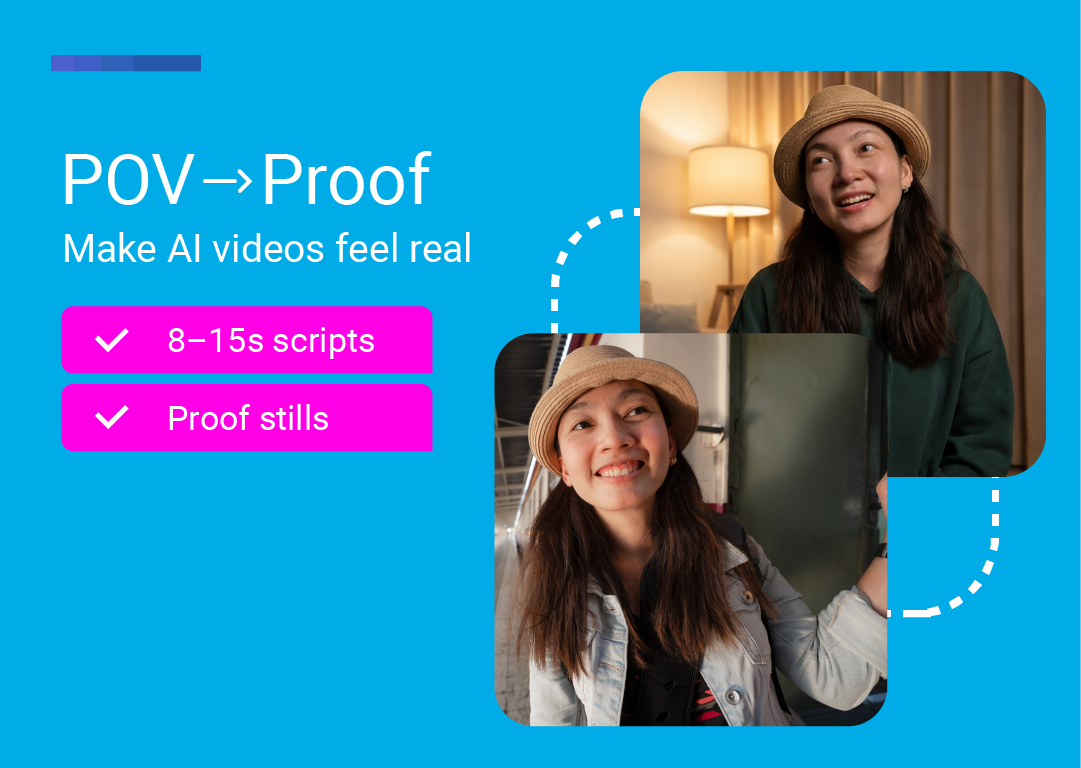
TikTok rewards engaging content that feels native—fast hooks, clear framing, and repeatable formats.
But posting consistently is hard for one simple reason: life keeps happening. Trips. Meetings. Sick days. Launch weeks. Days when you could post—but you don’t.
That’s where an AI avatar becomes more than a shortcut. Used well, it becomes a system.
This guide shows a simple, repeatable format for AI avatar video on TikTok (and it works on Reels/Shorts too):
A short POV-style talking avatar clip (8–15 seconds)
Plus a matching proof frame (a still image of the same avatar in a different location)
Together, it’s a pattern interrupt that feels native, builds believability, and makes video creation easier to scale—without traditional video production.
When people search AI avatars for TikTok or TikTok AI avatar, they’re usually looking for one of three things:
A way to create AI avatar videos that look like a real person talking (not a cartoon).
A faster way to make short-form videos without actors, filming, or a full video editor workflow.
A repeatable content format that doesn’t require constant new ideas.
Depending on the tool, you can use:
Digital avatars (stock avatars)
Custom avatars (your own AI avatar / “digital twin” built from your footage)
The goal for TikTok isn’t “perfect production.” It’s credible delivery—natural facial expressions, clear voice, and a hook that lands.
This system is a two-part post:
POV clip (video): a short, selfie-style avatar video that delivers the hook.
Proof frame (still image): a single still that reinforces the claim with context, specificity, or social proof.
The goal isn’t to “look AI.” The goal is to look realistic, clear, and consistent.
Why the proof frame works
TikTok is full of claims. The proof frame makes your claim feel more believable—without adding minutes of editing.
Think of it like a “receipt.”
You don’t need advanced design skills to start. Here’s the workflow:
Pick your avatar type
Stock/digital avatar (fastest)
Custom avatar (your own AI avatar / digital twin)
Write a short script
One hook
One claim
One CTA
Generate the video
Aim for natural delivery: clear voice, natural expressions, clean pacing
If your tool supports it: adjust emotion/energy and check lip sync
Create the proof frame (single image)
Use a still of the avatar in a different location/background
Post + iterate
Save the best hooks
Reuse the structure
Rotate proof frames
Note: Some platforms allow multiple languages, voice options, or voice cloning. If you’re marketing globally, that can help you generate videos for different audiences.
Use these as on-screen text, caption, or the first spoken line.
“She’s boarding right now. I’m her AI avatar. I’ve got the content covered.”
“She’s somewhere above the clouds. I’m still here posting. We don’t miss days anymore.”
“She’s on vacation. I’m still showing up for you. That’s the system now.”
“She’s building the business… I’m building the content. We split the work.”
“He didn’t feel like posting today… so I did it for him. You’re welcome!”
“She doesn’t post anymore… she delegates. To me.”
Pair each POV clip with a proof frame that shows the real-life moment behind the hook.
In this format, the proof frame isn’t a “text overlay checklist.” It’s a visual receipt — the exact situation happening (airport, plane, hotel, taxi, etc.) that makes the POV feel instantly believable.
Boarding / airport moment
Use a still like:
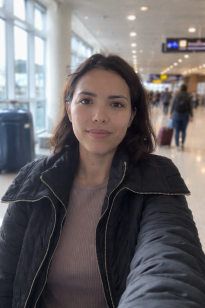
Optional micro-overlay (2–4 words max): “Boarding now.” / “Airport day.” / “Still posting.”
Flying / in-air moment
Use a still like:
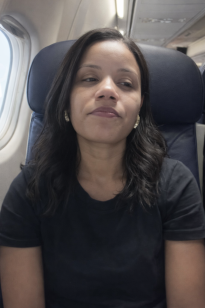
Optional micro-overlay (2–4 words max): “In-flight.” / “Above the clouds.” / “Content’s covered.”
Keep the proof frame quiet:
The photo does 90% of the work
If you add text: one short line (2–4 words)
Avoid “framework/system/checklist” language on the image — save that for the caption
You don’t need a photoshoot to get “real-life receipt” proof frames.
The easiest workflow is:
Start with a clear still of your avatar (face visible, good lighting).
Use an AI image tool (e.g., ChatGPT image editing) to keep the same person but change the context/background to match the moment (airport, plane, taxi, hotel lobby).
Keep it realistic: natural lighting, slight imperfection, phone-camera feel.
Add a micro-overlay only if needed (2–4 words max).
Use this structure so the tool preserves identity:
Prompt: “Edit this image. Keep the same person’s face and identity exactly the same. Change only the setting to: [SCENE]. Make it look like a real smartphone photo (natural light, slight grain, candid). Keep clothing similar/change clothing. No heavy beautification, no cartoon look, no AI-gloss. Background should be realistic and slightly out of focus.”
The fastest way to avoid the “obviously AI” vibe is to start with the right kind of avatar.
At LipSynthesis, our avatars are real humans filmed on location (not CGI faces), so you begin with natural expressions and believable presence—then you fine-tune delivery so it feels native on TikTok.
To keep your videos realistic, focus on:
Natural facial expressions
Pick an avatar that already matches the vibe (calm, friendly, confident). If the face feels too “performative,” switch avatars rather than forcing the script.
Clear pacing
Write for spoken rhythm—short lines, natural pauses, no rushed words.
Simple scripts (TikTok language)
One hook → one point → one CTA. Keep it conversational, not “ad copy.”
Believable camera framing (selfie-style)
Tight crop, eye-level angle, minimal distractions—like a real creator talking to camera.
Direct the delivery with emotion controls
Small shifts in tone often matter more than the words. LipSynthesis includes built-in emotion control (8 emotions + a temperature slider) so you can steer the performance without rewriting the whole script.
Learn more here: AI voices and emotions
Always preview before posting—especially for lip sync, pacing, and whether the hook lands.
If something feels off (wrong energy, wrong avatar for the context, hook not sharp enough), don’t “ship it anyway.” With the LipSynthesis Pro plan’s unlimited generation, you can simply regenerate variations until it feels right—swap the avatar, adjust emotion, or tighten the first line and try again.
In the past, consistent TikTok output usually meant one of two things: you filmed constantly, or you disappeared for weeks.
AI avatars change that trade-off. When you have a repeatable POV format and a simple proof frame, you can keep showing up—even when you’re traveling, deep in build mode, or just not feeling camera-ready.
If you’re building a TikTok presence for a brand, a creator account, or a performance marketing pipeline, this is the shift: more creative iterations without more production days.
Ready to try it?
Try LipSynthesis for free and generate your first POV avatar clip—then pair it with a proof frame and post it today.
Start Creating with Real Human Avatars → Sign up now
See How Custom Avatars Work → Custom AI avatars guide
By the LipSynthesis Team
We're on a mission to make video creation accessible to everyone—using real people, not CGI. Our platform features hundreds of eal human avatars filmed on location, plus custom avatar creation so you can scale your own presence through AI.
Explore our platform at lipsynthesis.com or read more insights on our blog.