


Learn LipSynthesis Emotions Control voice settings to improve avatar delivery. Includes a quick workflow, script templates, and FAQs.
Your script can be solid and still fall flat if the delivery feels “neutral.” People don’t just react to words—they react to emotion: calm confidence, excitement, urgency, surprise.
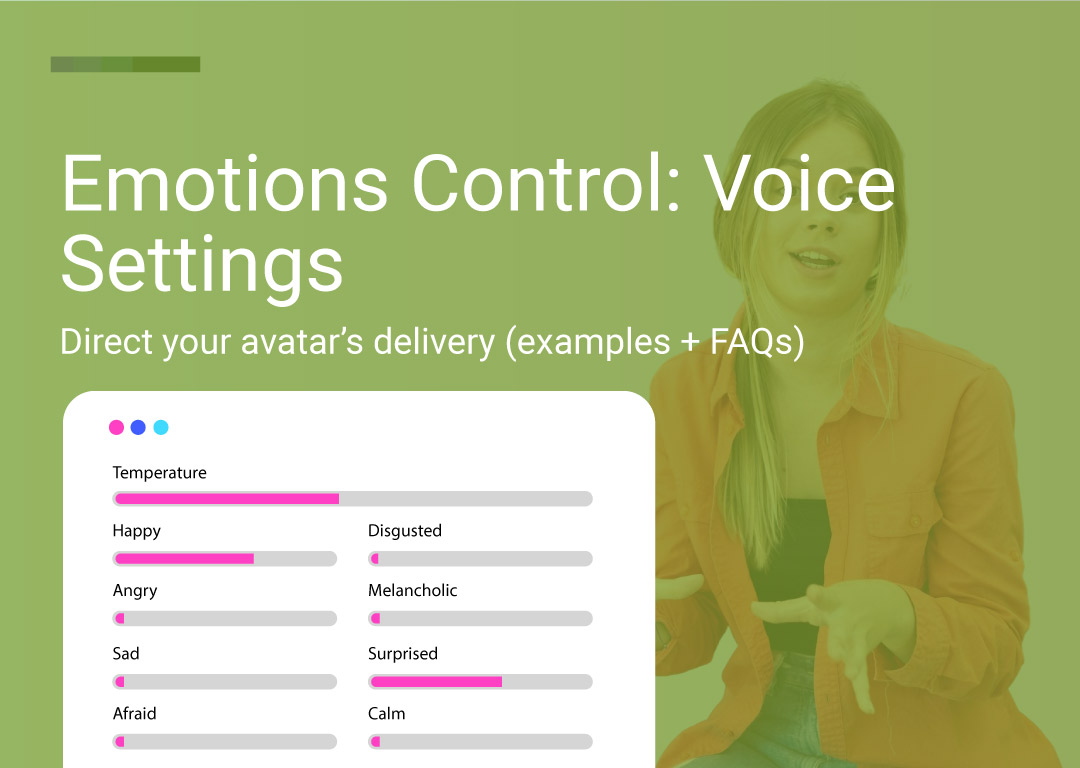
LipSynthesis Emotions Control (available to everyone) lets you shape how your avatar sounds using simple sliders—so your message lands the way you intended.
Emotions Control lets you adjust the tone of the voice using simple sliders. Think of it like directing a voice actor:
“Say it like you’re excited.”
“Make it calmer and more reassuring.”
“Add a hint of sadness — but keep it subtle.”
“Deliver it with surprise so the hook lands.”
Instead of re-writing your script 10 times, you can keep the message and change the feeling.
You have 8 emotion sliders plus Temperature:
Happy
Angry
Sad
Afraid
Disgusted
Melancholic
Surprised
Calm
Temperature (conservative --- creative)
Here’s a practical cheat sheet for common content types:
Happy — upbeat, friendly, “good news” energy
Best for: product reveals, welcome videos, creator-style intros, UGC-style enthusiasm
Calm — steady, reassuring, confident
Best for: onboarding, customer support messages, training videos, “here’s how it works”
Surprised — punchier delivery, stronger hook potential
Best for: short-form hooks, pattern interrupts, “wait—did you know this?” moments
Angry — intensity, frustration, urgency (use lightly)
Best for: problem-first ads, calling out pain points, “stop doing this” style content
Sad — softer, more emotional delivery
Best for: storytelling, founder moments, sensitive topics, cause-driven messaging
Melancholic — reflective, thoughtful, “late-night honest” vibe
Best for: deeper narratives, brand stories, personal lessons, creator monologues
Afraid — tension, uncertainty, “this is risky” energy
Best for: security warnings, risk framing, “don’t make this mistake” content
Disgusted — strong “nope” reaction, sharp contrast
Best for: comedic skits, reactions, “things I hate about…” content, bold opinion posts
Temperature controls how safe vs expressive the delivery feels.
More conservative = cleaner, steadier, less variation (great for professional training, support, corporate tone)
More creative = more expressive, more personality (great for UGC, social hooks, character content)
If you’re aiming for “authentic creator energy,” nudge it toward creative.
If you’re doing internal comms or training, keep it conservative.
A few simple rules make a huge difference:
Write one script (don’t change the words yet).
This keeps your testing clean: you’ll know whether performance changes came from the delivery, not the copy.
Pick one “main emotion” per video
If everything is boosted, nothing feels real. Choose a primary emotion and keep the rest low.
Use emotions to match the intent, not the words
A “Happy” voice can still say serious things — but it changes how it lands.
Generate 2–3 variations by changing only:
the primary emotion level
Temperature (more conservative for “professional,” more creative for “UGC/social”)
Same script, different emotion settings = instant A/B testing for ads, hooks, and landing-page videos.
Choose the best performer and then iterate the script only if needed.
Subtle usually wins: Real people rarely sound 100% angry or 100% surprised. A small push often feels the most believable.
Script:
“I built this because I was tired of spending hours creating videos.”
Melancholic + Calm → founder story / reflective
Angry + slightly creative temperature → problem-first ad energy
Surprised + Happy → social hook / creator vibe
Same words. Different emotional “meaning.”
If you’re using avatar videos for UGC ads, testimonials, onboarding, or outreach, emotion is the difference between:
“This feels like a real person talking to me”
and
“This feels like a generated video.”
Emotions Control helps you get closer to the first one — without extra filming, reshoots, or rewriting.
Pick an avatar, paste your script, and test 2–3 emotion variations.
You’ll be surprised how quickly you find a version that clicks.
Create your first video (free)
Use this as a starting point (then tweak based on your brand voice).
Use case | Primary emotion | Temperature | Why it works |
|---|---|---|---|
UGC-style ads / creator hooks | Happy or Surprised | More creative | Feels energetic and “native” to social |
Product explainer / feature demo | Calm | Slightly conservative | Clear, confident, easy to follow |
Testimonial / social proof | Calm + hint of Melancholic | Neutral | More sincere, less “salesy” |
Problem-first ad / calling out pain | Angry (light) | Neutral to creative | Adds urgency without sounding harsh |
Founder story / mission | Melancholic | Neutral | Reflective, human, believable |
Sensitive topics / empathy | Sad (light) | Slightly conservative | Softer tone, more care |
Risk framing / warnings | Afraid (light) | Neutral | Adds tension and attention |
Reaction / comedic “nope” | Disgusted | More creative | Strong contrast, punchline-ready |
Below are ready-to-use examples you can paste into LipSynthesis. Each one includes a suggested “director setup.”
Script: “Okay, quick one—this is what I’m using to turn one script into multiple videos without filming every time.”
Settings: Happy (primary), Temperature slightly creative
Script: “Pick an avatar, choose a voice, paste your script, and generate. That’s it—no editing skills needed.”
Settings: Calm (primary), Temperature slightly conservative
Script: “If you’re still making videos the slow way, you’re paying for it in time. Here’s the faster workflow I wish I used earlier.”
Settings: Surprised (primary), Temperature more creative
Script: “I didn’t expect this to save me as much time as it did. But after a few tries, it just clicked.”
Settings: Calm (primary) + hint of Melancholic, Temperature neutral
Script: “We built this because video creation shouldn’t be locked behind big budgets and production teams.”
Settings: Melancholic (primary), Temperature neutral
Script: “Most teams don’t have a content problem—they have a production bottleneck. And it’s killing consistency.”
Settings: Angry (light, primary), Temperature neutral
Script: “If you’re stuck, you’re not alone. Here’s the quickest way to get your next video generated.”
Settings: Calm (primary), Temperature neutral
Script: “Before you publish your next video, check this—because one small mistake can tank the result.”
Settings: Afraid (light, primary), Temperature neutral
Script: “I’m sorry, but if your ‘AI video’ sounds like a robot reading a script… people can tell.”
Settings: Disgusted (primary), Temperature more creative
Script: “If you want, try the same script in two moods—calm and surprised—and see which one feels more you.”
Settings: Calm (primary), Temperature neutral
Use these as repeatable formats for socials and as testing frameworks.
Same script, 3 moods
Example: “Here’s the exact same line in Calm vs Happy vs Surprised—tell me which feels most real.”
Hook showdown
Example: “Which hook wins: Surprised delivery or Angry delivery? Same words. Different vibe.”
Use-case mini series
Example: “Best emotion settings for: testimonials (Calm + Melancholic). Next: onboarding (Calm).”
Behind-the-scenes ‘director notes’
Example: “If your video feels overacted, lower Temperature and pick one primary emotion.”
Before/after delivery
Example: “Neutral voice vs emotion-controlled voice—same script, totally different trust level.”
Is Emotions Control available to everyone?
Yes—Emotions Control is available to all users (inlcuding free plan).
What emotions can I control?
Happy, Angry, Sad, Afraid, Disgusted, Melancholic, Surprised, and Calm.
What does the Temperature slider do?
It adjusts how conservative vs creative the delivery feels. Conservative is steadier; creative is more expressive.
Should I combine multiple emotions at once?
You can, but for the most natural result, start with one primary emotion and keep everything else low.
How many variations should I generate?
Start with 2–3 variations per script (e.g., Calm vs Happy vs Surprised). It’s fast and makes performance differences easier to spot.
Which emotion is best for ads?
For UGC-style ads, start with Happy or Surprised and a more creative Temperature. For problem-first ads, try Angry lightly.
Which emotion is best for testimonials?
Start with Calm, then add a small hint of Melancholic if you want it to feel more reflective and sincere.
Pick an avatar, paste one of the scripts above, and generate two emotion variations. You’ll feel the difference immediately.
Because the best AI videos don't just look real. They ARE real.
Start Creating with Real Human Avatars → Sign up now
See How Custom Avatars Work → Custom AI Avatars guide
By the LipSynthesis Team
We're on a mission to make video creation accessible to everyone—using real people, not CGI. Our platform features hundreds of real human avatars filmed on location, plus custom avatar creation so you can scale your own presence through AI.
Explore our platform at lipsynthesis.com or read more insights on our blog.